
SophIA, notes and clinical support: a more seamless way of working
In clinical practice, every detail matters. That is why, in TMH Suite, we have improved access to the Notes and Clinical support (SophIA) tools, so you can work more efficiently, in a more organised and connected way when managing appointments and patients.
Faster access from your appointments and queries
You can now easily access both the Patient notes and the Clinical support section directly from different areas of TMH Suite, without having to constantly switch screens or interrupt your workflow.
Moreover, appointment information has been reorganised to provide a clearer and more user-friendly view during the query.
✨ New “Clinical support” button
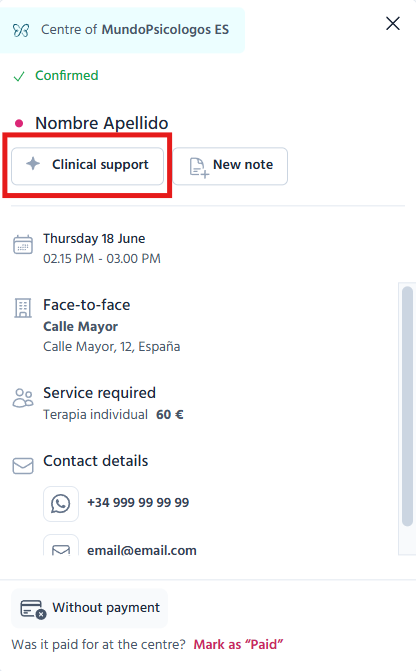
Within the appointment details and editing screen, you will find the new “Clinical support” button.
This opens a new SophIA chat regarding that patient, which allows you to
● ponder over the case whilst maintaining the clinical context;
● organise information or working hypotheses;
● explore ideas or therapeutic approaches;
● seek clinical support without leaving appointment management screen.
What is more, the chat opens in a new tab, so you can carry on working without interrupting your current screen.
New shortcut to “New note”
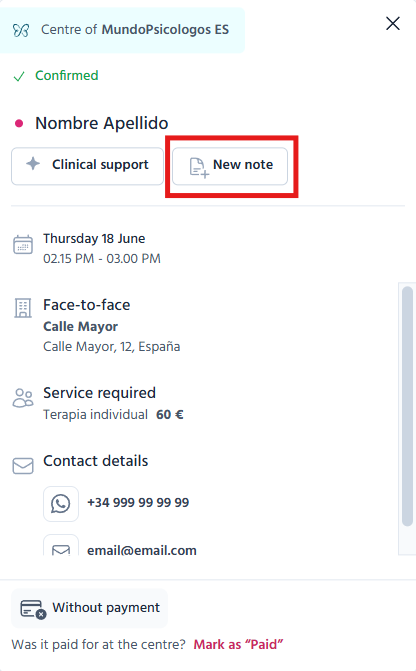
Next to the “Clinical Support” button, you will also find the “New note” button.
When you click it,
● you will go straight to the patient’s notes
● The note creation form will open automatically
This makes it easier to record clinical information immediately during or after the session, thus reducing steps and streamlining patient follow-up.
A more natural link between notes and clinical support
The notes and clinical support sections are designed to complement each other during therapeutic work.
Many professionals need to constantly switch between
● recording clinical observations;
● organising relevant session information;
● pondering over a case;
● exploring possible approaches or working hypotheses.
This workflow is now much more natural, as you can easily switch between patient notes and the clinical support section with SophIA, while keeping all information linked to the same clinical context.
Also available when editing appointments
All these improvements are also available within the appointment editing screen.
From there, you can continue to quickly access both the Clinical support section and the creation of new notes, hence ensuring a more convenient and organised navigation throughout your daily practice.